# Terraform Cloud/Terraform Enterprise Integration
Terraform Cloud is HashiCorp's managed infrastructure automation platform that lets teams collaborate on Terraform runs, manage state remotely, and enforce policies across their infrastructure. It supports workspace-level webhook notifications that fire on run events — making it easy to route pipeline failures, plan results, and apply outcomes directly into ITOC360.
### In ITOC360
Go to Sources, click **Create Source**, and select **Terraform Cloud** from the list. Once the source is created, copy the webhook URL and token from the source detail page — you will need these when configuring Terraform Cloud.
### In Terraform Cloud
Open your workspace and navigate to **Settings → Notifications** from the left sidebar.\
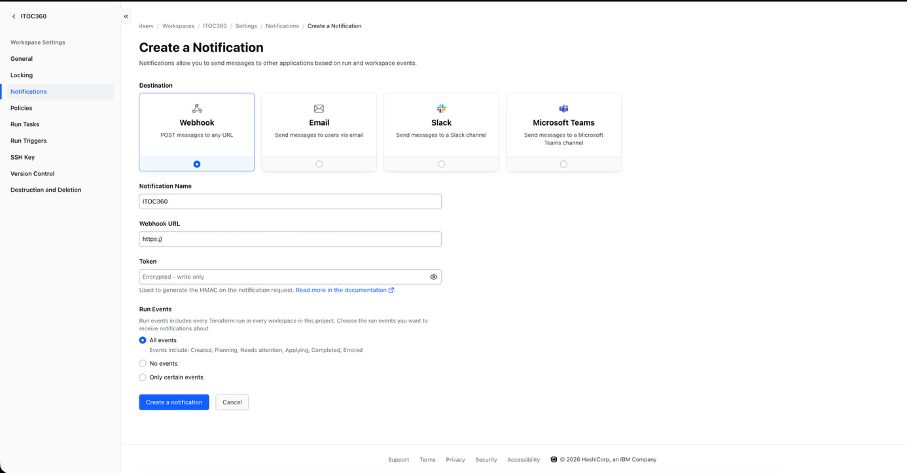
Click **Create a Notification** in the top right corner. On the form that appears, select **Webhook** as the destination type. Give the notification a name and paste your ITOC360 webhook URL into the **Webhook URL** field, appending your source token as a query parameter:
```
https://?token=
```
Leave the **Token** field empty. Under **Run Events**, select **All events** so that ITOC360 receives notifications for every stage of a run. Click **Create a notification** to save.\
Terraform Cloud will immediately send a verification request to your webhook URL. If ITOC360 responds with a success, the notification will be enabled automatically and appear in your notifications list.\
***
### Notes
* Terraform Cloud sends a separate notification for each run stage: Created, Planning, Needs Attention, Applying, Completed, and Errored. ITOC360 treats a run as resolved only when it reaches the **Applied** (completed) state.
* The **Token** field in Terraform Cloud is used for HMAC-SHA512 request signing and is separate from your ITOC360 source token. You do not need to fill it in for ITOC360 to work.
* Notifications are workspace-specific. If you have multiple workspaces, you will need to create a notification configuration in each one.