# StatusCake Integration
StatusCake is an uptime and performance monitoring tool that tracks whether your websites, APIs, and servers are reachable. When a monitored endpoint goes down or comes back up, StatusCake can notify any webhook URL you configure — including ITOC360.
This integration connects StatusCake to itoc360 through a Contact Group. Every time a test fails or recovers, ITOC360 receives the alert automatically and creates or resolves the corresponding incident.
### How It Works
StatusCake sends an HTTP POST request with form-encoded data to your ITOC360 webhook URL whenever a test changes state. The `Status` field in the payload tells ITOC360 whether the endpoint is `DOWN` (open an incident) or `UP` (resolve it). The combination of test name and URL is used to match open and resolved incidents together.
### Prerequisites
* A StatusCake account
* Your ITOC360 webhook URL, generated when you create the integration
### In ITOC360
Go to **Sources**, click **Create Source** , and select **StatusCake** from the list. Copy the webhook URL that appears — you'll need it in the next step.
### In StatusCake
#### Step 1 — Create a Contact Group
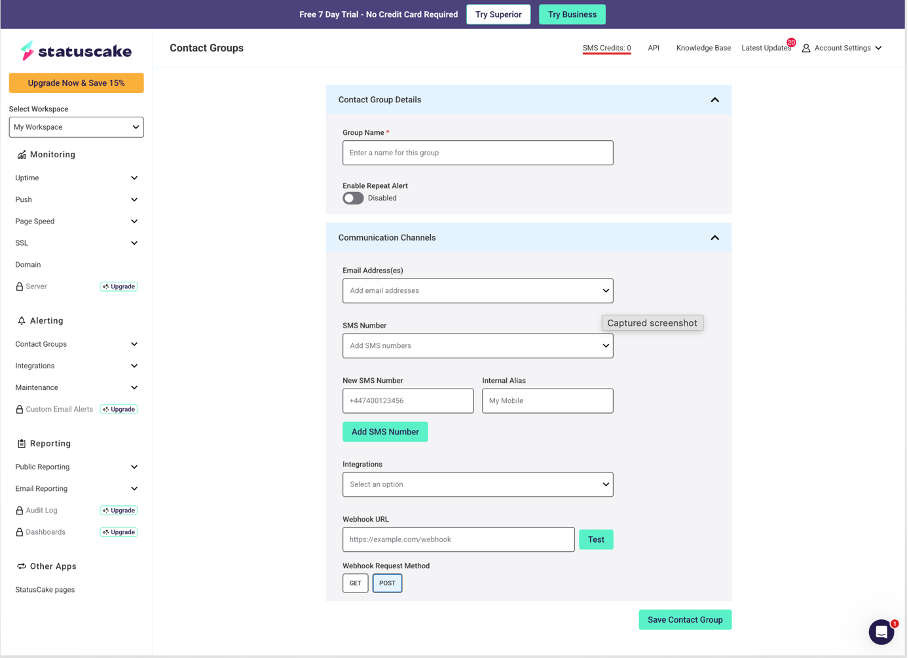
In the left sidebar, go to **Alerting → Contact Groups**, then click **New Contact Group**.
Fill in the form as follows:
* **Group Name** — give it a recognizable name, like `itoc360`
* **Enable Repeat Alert** — leave this disabled (the toggle should show "Disabled")
* **Webhook URL** — paste your ITOC360 webhook URL here
* **Webhook Request Method** — select **POST**
You can ignore the Email and SMS fields.
Click **Save Contact Group**.
#### Step 2 — Create an Uptime Test
In the left sidebar, go to **Monitoring → Uptime**, then click **New Uptime Test** on the right side of the page.
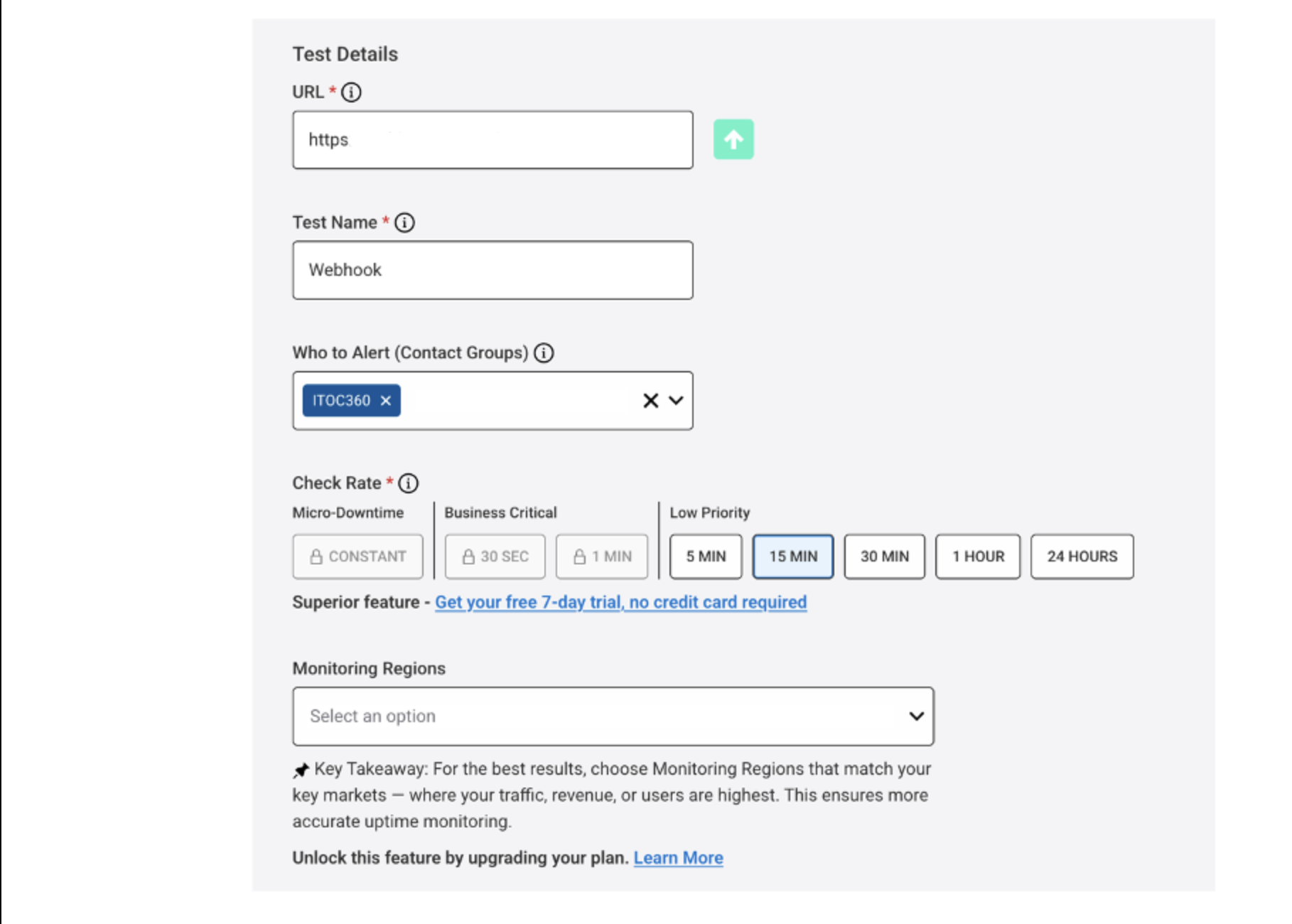
Fill in the test details:
* **URL** — the endpoint you want to monitor (e.g. `https://yourapp.com`)
* **Test Name** — a descriptive name for the test
* **Who to Alert (Contact Groups)** — select the Contact Group you created in Step 1 (e.g. `ITOC360`)
* **Check Rate** — choose how often StatusCake should check the endpoint; **15 MIN** is a reasonable default for most use cases
Scroll down and click **Create Test**.
### Alert Behavior
| Status | itoc360 Action |
| ------ | ------------------------------ |
| `DOWN` | Opens a new incident |
| `UP` | Resolves the existing incident |
StatusCake identifies which test triggered the webhook using the test name and monitored URL — ITOC360 uses these together as the incident fingerprint, so open and resolved events are always matched correctly.
### Notes
* StatusCake sends webhook payloads as `application/x-www-form-urlencoded`, not JSON. itoc360 handles this automatically.
* If you want to monitor multiple endpoints, create a separate Uptime Test for each one and assign the same Contact Group to all of them.
* The **Enable Repeat Alert** option in the Contact Group should stay disabled to avoid duplicate incidents in ITOC360 for the same outage.