# SigNoz Integration
### Overview
SigNoz is an open-source observability platform built on OpenTelemetry. It provides unified APM, logs, traces, metrics, and alerting in a single tool — a self-hostable alternative to Datadog and New Relic. SigNoz includes a built-in Alertmanager, so no external Alertmanager deployment is required. When alert thresholds are breached, SigNoz delivers a structured webhook payload directly to the platform. Resolved events are sent automatically when the condition clears.
This integration supports automatic alert creation on firing events and automatic resolution when SigNoz sends a resolved notification.
### Integration Flow
1. You define alert rules in SigNoz based on metrics, logs, or traces.
2. SigNoz evaluates these rules continuously against incoming telemetry data.
3. When a rule condition is met, the built-in Alertmanager routes the alert to configured notification channels.
4. The platform receives a webhook POST request and creates an alert.
5. When the condition clears, SigNoz automatically sends a `resolved` notification and the platform closes the alert.
***
### Webhook Payload Schema
The payload follows the standard Prometheus Alertmanager webhook format (version 4). SigNoz adds a `message` field inside `annotations` alongside the standard `summary` and `description`.
```json
{
"receiver": "string",
"status": "firing | resolved",
"alerts": [
{
"status": "firing | resolved",
"labels": {
"alertname": "string",
"severity": "string"
},
"annotations": {
"summary": "string",
"description": "string",
"message": "string"
},
"startsAt": "ISO8601 timestamp",
"endsAt": "ISO8601 timestamp",
"generatorURL": "string",
"fingerprint": "string"
}
],
"groupLabels": {
"alertname": "string",
"severity": "string"
},
"commonLabels": {
"alertname": "string",
"severity": "string"
},
"commonAnnotations": {
"summary": "string",
"description": "string",
"message": "string"
},
"externalURL": "string",
"version": "4",
"groupKey": "string",
"truncatedAlerts": 0
}
```
### Setup
#### Step 1 — Create an Alert Source on the Platform
1. Navigate to **Sources** → **Add Source**.
2. Search for **SigNoz** and select it.
3. Give the source a name and click **Save**.
4. Copy the generated **Webhook URL** and **Token**.
#### Step 2 — Navigate to Notification Channels in SigNoz
In your SigNoz instance, click **Settings** at the bottom of the left sidebar, then select **Notification Channels**.
SigNoz sidebar with Settings menu highlighted at the bottom left
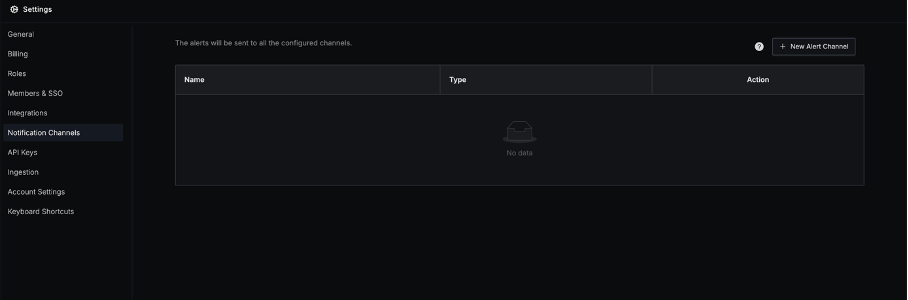
On the Notification Channels page, click **New Alert Channel**.
Notification Channels page (empty state) with the "New Alert Channel" button in the top right corner
#### Step 3 — Configure the Webhook Channel
Fill in the New Notification Channel form as follows:
* **Name**: Give the channel a descriptive name (e.g. `ITOC360`)
* **Send resolved alerts**: Toggle **ON** — this is required for automatic alert resolution on the platform
* **Type**: Select `Webhook`
* **Webhook URL**: Paste the Webhook URL copied from the platform in Step 1
* **User Name**: Leave empty
* **Password**: Paste your **Token** from the platform (SigNoz uses this as a bearer token)
Click **Test** to verify connectivity, then click **Save**.
New Notification Channel form filled with ITOC360 name, Webhook type, and the platform webhook URL
***
#### Step 4 — Verify the Channel Was Saved
After saving, the channel appears in the Notification Channels list with type `webhook`.
Notification Channels list showing the ITOC360 webhook channel with Edit and Delete actions
#### Step 5 — Assign the Channel to an Alert Rule
When creating or editing an alert rule in SigNoz (**Alerts** → **New Alert**), select the notification channel you created under **Notification Channels**. The alert will be routed to the platform when it fires.
#### Step 6 — Verify the Integration
Use the **Test** button on the notification channel to send a test payload. Confirm the alert appears on the platform under the source you created.
### Sample Payload
The following is a real payload captured during integration testing.
**ALERT (firing):**
```json
{
"receiver": "ITOC360",
"status": "firing",
"alerts": [
{
"status": "firing",
"labels": {
"alertname": "Test Alert (ITOC360)",
"severity": "critical"
},
"annotations": {
"description": "Test alert fired from SigNoz",
"message": "Test alert fired from SigNoz",
"summary": "Test alert fired from SigNoz"
},
"startsAt": "2026-03-10T13:53:07.6738108Z",
"endsAt": "0001-01-01T00:00:00Z",
"generatorURL": "",
"fingerprint": "e2947ae7eec5295f"
}
],
"groupLabels": {
"alertname": "Test Alert (ITOC360)",
"severity": "critical"
},
"commonLabels": {
"alertname": "Test Alert (ITOC360)",
"severity": "critical"
},
"commonAnnotations": {
"description": "Test alert fired from SigNoz",
"message": "Test alert fired from SigNoz",
"summary": "Test alert fired from SigNoz"
},
"externalURL": "https://artistic-raccoon.eu2.signoz.cloud",
"version": "4",
"groupKey": "ITOC360-e2947ae7eec5295f-1773150787",
"truncatedAlerts": 0
}
```
**RESOLVE (resolved):**
```json
{
"receiver": "ITOC360",
"status": "resolved",
"alerts": [
{
"status": "resolved",
"labels": {
"alertname": "Test Alert (ITOC360)",
"severity": "critical"
},
"annotations": {
"description": "Test alert fired from SigNoz",
"message": "Test alert fired from SigNoz",
"summary": "Test alert fired from SigNoz"
},
"startsAt": "2026-03-10T13:53:07.6738108Z",
"endsAt": "2026-03-10T14:10:00.000Z",
"generatorURL": "",
"fingerprint": "e2947ae7eec5295f"
}
],
"groupLabels": {
"alertname": "Test Alert (ITOC360)",
"severity": "critical"
},
"commonLabels": {
"alertname": "Test Alert (ITOC360)",
"severity": "critical"
},
"commonAnnotations": {
"description": "Test alert fired from SigNoz",
"message": "Test alert fired from SigNoz",
"summary": "Test alert fired from SigNoz"
},
"externalURL": "https://artistic-raccoon.eu2.signoz.cloud",
"version": "4",
"groupKey": "ITOC360-e2947ae7eec5295f-1773150787",
"truncatedAlerts": 0
}
```
***
### Field Mapping Reference
| Payload Field | Description |
| ----------------------------------- | ---------------------------------------------------------------------------------- |
| `status` | Top-level event type: `firing` → ALERT, `resolved` → RESOLVE |
| `alerts[0].fingerprint` | Unique identifier per alert label set — used for fingerprint matching |
| `alerts[0].labels.alertname` | Name of the alert rule that fired |
| `alerts[0].labels.severity` | Severity label from the rule definition — used for priority mapping |
| `alerts[0].annotations.summary` | Short human-readable alert title |
| `alerts[0].annotations.description` | Detailed description of the alert condition |
| `alerts[0].annotations.message` | Additional message field specific to SigNoz (same value as summary in test alerts) |
| `alerts[0].startsAt` | ISO 8601 timestamp when the alert started firing |
| `alerts[0].endsAt` | ISO 8601 timestamp when resolved (`0001-...` means still active) |
| `commonLabels` | Labels shared across all alerts in this group |
| `commonAnnotations` | Annotations shared across all alerts in this group |
| `externalURL` | URL of the SigNoz instance that sent the alert |
| `groupKey` | SigNoz-specific group key used for alert deduplication |
### Priority Mapping
The platform maps the `severity` label from the alert rule to an internal priority level.
| SigNoz `severity` Label | Platform Priority |
| ----------------------- | ----------------- |
| `critical` | CRITICAL |
| `error` | HIGH |
| `warning` | MEDIUM |
| `info` | LOW |
| *(not set)* | MEDIUM (default) |
> The `severity` label is set in your SigNoz alert rule definition. It is a required field when creating alerts in SigNoz.
### RESOLVE Detection
The platform automatically resolves an alert when SigNoz sends a payload with `"status": "resolved"`. This requires the **Send resolved alerts** toggle to be enabled on the notification channel (set in Step 3).
The resolved event is matched to the original alert using the `fingerprint` field, which SigNoz generates deterministically from the alert's label set. As long as the labels do not change between firing and resolution, the fingerprint will match and the alert will be closed automatically.