# Google Security Command Center(SCC) Integration
## Google Security Command Center Integration
Google Cloud Security Command Center (SCC) is Google Cloud's centralized security and risk management platform. It provides threat detection, vulnerability assessment, and compliance monitoring across your Google Cloud environment.
Since SCC does not support direct outbound webhook calls, notifications are routed through Google Cloud's Pub/Sub messaging service. A Cloud Function acts as the middleware: it receives the Pub/Sub message, decodes the Base64-encoded payload, and forwards the raw SCC JSON directly to the platform's webhook endpoint. The platform then processes the payload using JSONPath-based priority mapping to create and manage alerts.
**Integration Flow**
```
SCC Finding → Pub/Sub Topic → Cloud Function → HTTP POST → Platform Webhook
```
1. Google SCC detects a security finding (e.g., a misconfiguration or active threat) in your cloud environment.
2. The SCC Continuous Export publishes the finding to a Pub/Sub topic.
3. The Cloud Function is triggered by the Pub/Sub topic, decodes the Base64-encoded message, and forwards the raw JSON payload to the platform webhook without any transformation.
4. The platform receives the payload, evaluates the `finding.severity` field via JSONPath, maps it to the internal priority scale, and creates or resolves the alert accordingly.
### Provider Configuration
The platform uses JSONPath-based priority mapping to extract the severity value directly from the raw SCC payload.
**Priority Mapping Config:**
```json
{
"priority": {
"field": "$.finding.severity",
"options": [
{ "value": "CRITICAL", "label": "Critical" },
{ "value": "HIGH", "label": "High" },
{ "value": "MEDIUM", "label": "Medium" },
{ "value": "LOW", "label": "Low" }
],
"mapping": {
"CRITICAL": "CRITICAL",
"HIGH": "HIGH",
"MEDIUM": "MEDIUM",
"LOW": "LOW"
}
}
}
```
**Status (Event Type) Mapping:**
| SCC Finding State | Platform Event Type | Platform Status |
| ----------------- | ------------------- | --------------- |
| `ACTIVE` | ALERT | PROBLEM |
| `INACTIVE` | RESOLVE | RECOVERY |
**Fingerprint (Correlation) Field:** `$.finding.name`
SCC assigns a unique `finding.name` to each finding. The platform uses this field to correlate ACTIVE and INACTIVE events — both payloads must contain the identical `finding.name` value for recovery to work correctly.
### Webhook Payload Schema
| Field | Type | Description |
| ----------------------------- | ------ | ---------------------------------------------------------- |
| `finding.name` | string | Full resource name of the finding — correlation key |
| `finding.category` | string | Finding category (e.g., `OPEN_FIREWALL`, `PUBLIC_BUCKET`) |
| `finding.severity` | string | Severity level: `CRITICAL`, `HIGH`, `MEDIUM`, `LOW` |
| `finding.state` | string | Finding state: `ACTIVE`, `INACTIVE` |
| `finding.resourceName` | string | Full resource name of the affected GCP resource |
| `finding.createTime` | string | ISO 8601 timestamp when the finding was created |
| `finding.eventTime` | string | ISO 8601 timestamp of the event that triggered the finding |
| `finding.sourceProperties` | object | Additional context provided by the detection source |
| `resource.name` | string | Short name of the affected resource |
| `resource.type` | string | GCP resource type (e.g., `google.compute.Instance`) |
| `resource.projectDisplayName` | string | Human-readable project name |
### Alert Payload Examples
#### Raised (ACTIVE)
This payload is delivered when SCC detects a new security finding. The `finding.state` field is `ACTIVE`.
— ACTIVE payload received at webhook.site
```json
{
"finding": {
"name": "projects/YOUR_PROJECT_ID/sources/-/findings/TEST001",
"category": "TEST_OPEN_FIREWALL",
"severity": "HIGH",
"state": "ACTIVE",
"resourceName": "//compute.googleapis.com/projects/YOUR_PROJECT_ID/global/firewalls/test-firewall",
"createTime": "2026-02-25T10:00:00Z",
"eventTime": "2026-02-25T10:00:00Z"
},
"resource": {
"name": "test-firewall",
"type": "google.compute.Firewall",
"projectName": "projects/YOUR_PROJECT_ID",
"projectDisplayName": "YOUR_PROJECT_ID"
}
}
```
#### Cleared (INACTIVE)
This payload is delivered when a finding is resolved. The `finding.state` field changes to `INACTIVE`.
— INACTIVE payload received at webhook.site
```json
{
"finding": {
"name": "projects/YOUR_PROJECT_ID/sources/-/findings/TEST001",
"category": "TEST_OPEN_FIREWALL",
"severity": "HIGH",
"state": "INACTIVE",
"resourceName": "//compute.googleapis.com/projects/YOUR_PROJECT_ID/global/firewalls/test-firewall",
"createTime": "2026-02-25T10:00:00Z",
"eventTime": "2026-02-25T10:45:00Z"
},
"resource": {
"name": "test-firewall",
"type": "google.compute.Firewall",
"projectName": "projects/YOUR_PROJECT_ID",
"projectDisplayName": "YOUR_PROJECT_ID"
}
}
```
> **Important:** The `finding.name` value must be **identical** in both ACTIVE and INACTIVE payloads. The platform uses this field to match the recovery event to the original alert.
### Installation & Configuration
#### Step 1: Create an Alert Source in the Platform
1. Log in to the alert management platform.
2. Navigate to **Integrations → Add Integration**.
3. Select **Google Security Command Center** as the provider.
4. Name the integration (e.g., `Production GCP Security`).
5. Save and copy the generated **Webhook URL** and **Token**.
#### Step 2: Create a Pub/Sub Topic
1. In Google Cloud Console, search for **Pub/Sub** in the search bar and navigate to the service.
— Pub/Sub Topics page
2. Click **+ Create Topic**.
3. Set the **Topic ID** to `scc-alerts-topic`.
4. Leave **"Add a default subscription"** checked.
5. Click **Create**.
The topic detail page will confirm creation. The full topic path is shown as `projects/YOUR_PROJECT_ID/topics/scc-alerts-topic` and the default subscription `scc-alerts-topic-sub` will appear under the Subscriptions tab.
— scc-alerts-topic created with default subscription visible
#### Step 3: Create a Continuous Export in SCC
SCC Continuous Export sends all findings matching your filter to the Pub/Sub topic automatically.
> **Organization Requirement:** This step requires Organization-level access in Google Cloud. If your account does not have an organization (e.g., personal or trial projects), skip to the **Testing** section and use the manual Pub/Sub publish method to validate the integration end-to-end.
1. Navigate to **Security Command Center** in Google Cloud Console.
2. Go to **Settings → Continuous Exports** from the left menu.
3. Click **+ Create Export** and configure the following:
* **Name:** `scc-to-webhook`
* **Project:** Select the project where your Pub/Sub topic was created
* **Pub/Sub topic:** `scc-alerts-topic`
* **Filter:** Leave empty to receive all findings
> **Important:** If you set `state="ACTIVE"` as a filter, only new findings will be published to Pub/Sub. INACTIVE (recovery) events will not be sent, and the platform will never receive recovery notifications. Leave the filter empty to receive both ACTIVE and INACTIVE events.
4. Click **Save**.
#### Step 4: Deploy the Cloud Function
The Cloud Function receives Pub/Sub messages, decodes the Base64 payload, and forwards the raw SCC JSON to the platform webhook.
**4.1 — Navigate to Cloud Functions**
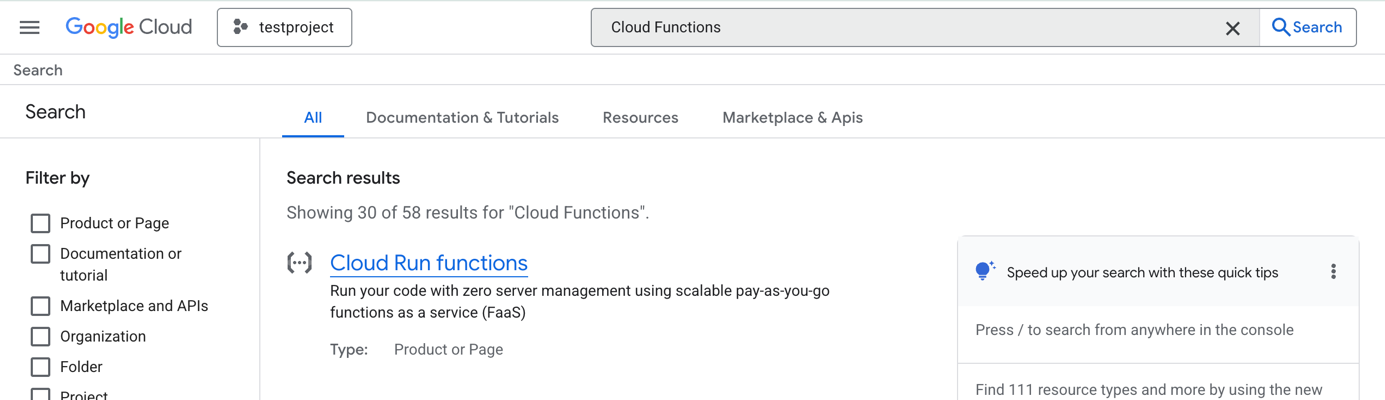
Search for **Cloud Functions** in the Google Cloud Console search bar and click on **Cloud Run functions** in the results.
— Cloud Functions search result \
\
**4.2 — Create the Service**
Click **+ Create Function**. On the Create service page:
* Select **"Use an inline editor to create a function"**
* **Service name:** `scc-webhook-forwarder`
* **Region:** `europe-west1` (or the same region as your Pub/Sub topic)
* **Runtime:** Node.js 24
— Create service form with Function option selected \
\
**4.3 — Configure the Pub/Sub Trigger**
Click **+ Add trigger** and select **Cloud Pub/Sub** from the dropdown. The Eventarc trigger panel will open.
If prompted to **Enable required APIs**, click **Enable** and wait for the Eventarc API to activate.
In the Eventarc trigger panel:
* **Event provider:** Cloud Pub/Sub (already set)
* **Event type:** `google.cloud.pubsub.topic.v1.messagePublished` (already set)
* **Select a Cloud Pub/Sub topic:** Choose `scc-alerts-topic`
* Click **Grant** on the IAM role warning to allow Pub/Sub to create identity tokens
Click **Save trigger**.
The trigger configuration will now show the connected topic and service account.
— Eventarc trigger configured with scc-alerts-topic \
\
The full service configuration page with trigger, runtime, and authentication settings will be visible before deployment.
— Complete service configuration ready for deployment \
\
Click **Create**.
**4.4 — Add the Function Code**
After the service is created, the Source tab will open with the inline code editor.
* Set the **Function entry point** to `forwardSccToWebhook`
* Replace the contents of `index.js` with the following code:
```javascript
const https = require('https');
exports.forwardSccToWebhook = async (req, res) => {
try {
const body = req.body;
// Cloud Run Eventarc: Pub/Sub message arrives in body.message.data
const messageData = body?.message?.data || '';
const rawSccData = messageData
? Buffer.from(messageData, 'base64').toString('utf8')
: '{}';
console.log('SCC finding received:', rawSccData.substring(0, 200));
// Replace with your platform webhook URL from Step 1
const webhookUrl = 'https://YOUR_PLATFORM_WEBHOOK_URL_HERE';
const url = new URL(webhookUrl);
const options = {
hostname: url.hostname,
path: url.pathname + url.search,
method: 'POST',
headers: {
'Content-Type': 'application/json',
'Content-Length': Buffer.byteLength(rawSccData)
}
};
await new Promise((resolve, reject) => {
const request = https.request(options, (response) => {
console.log(`Webhook response: ${response.statusCode}`);
resolve();
});
request.on('error', reject);
request.write(rawSccData);
request.end();
});
res.status(200).send('OK');
} catch (e) {
console.error(`Error: ${e.message}`);
res.status(500).send(e.message);
}
};
```
Replace `https://YOUR_PLATFORM_WEBHOOK_URL_HERE` with the Webhook URL copied from Step 1.
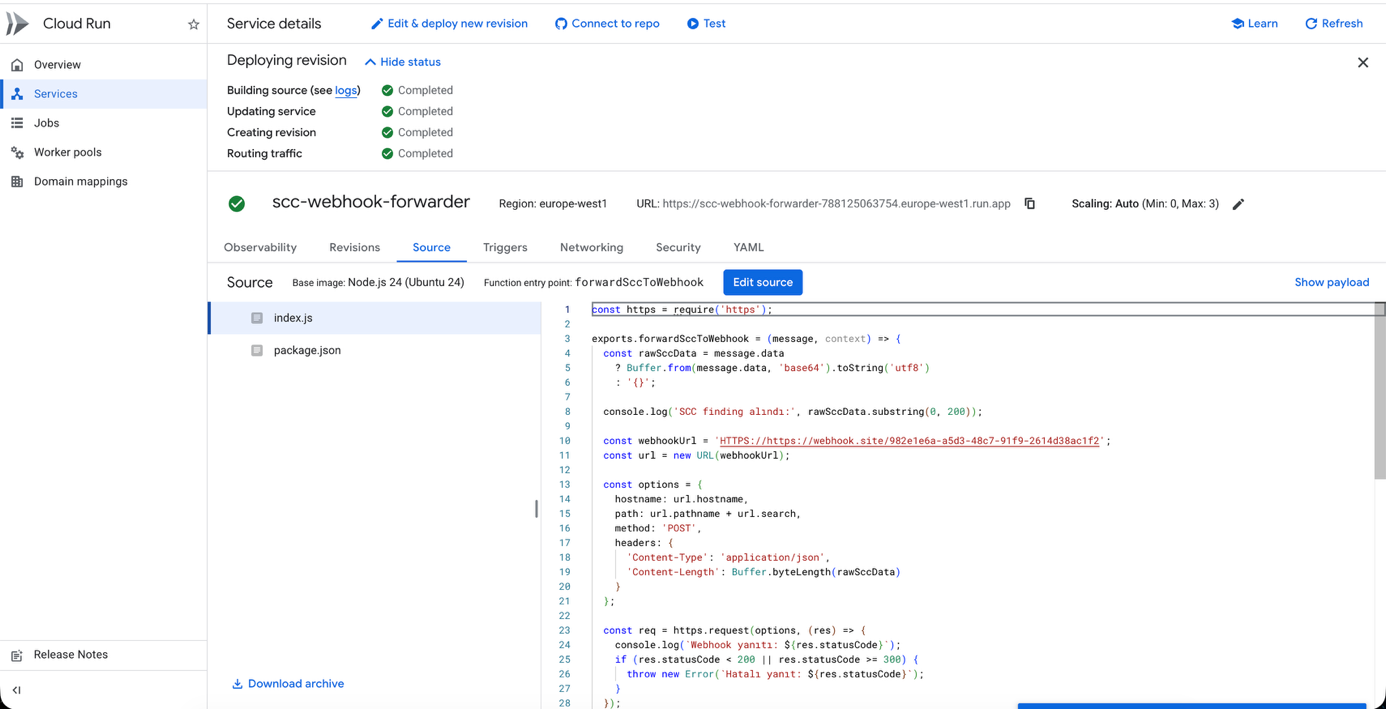
Click **Save and redeploy**. Wait for all deployment steps to show green checkmarks.
— Cloud Function deployed successfully with green tick, entry point forwardSccToWebhook visible
### Testing
#### Option A — Manual Pub/Sub Publish (Recommended)
This method bypasses SCC entirely and tests the Cloud Function → Webhook path directly. It works regardless of whether you have Organization-level access.
Open **Cloud Shell** from the Google Cloud Console toolbar and run the following commands:
**ACTIVE — Create an alert:**
```bash
gcloud pubsub topics publish scc-alerts-topic \
--message='{"finding":{"name":"projects/YOUR_PROJECT_ID/sources/-/findings/TEST001","category":"TEST_OPEN_FIREWALL","severity":"HIGH","state":"ACTIVE","resourceName":"//compute.googleapis.com/projects/YOUR_PROJECT_ID/global/firewalls/test-firewall","createTime":"2026-02-25T10:00:00Z","eventTime":"2026-02-25T10:00:00Z"},"resource":{"name":"test-firewall","type":"google.compute.Firewall","projectName":"projects/YOUR_PROJECT_ID","projectDisplayName":"YOUR_PROJECT_ID"}}'
```
**INACTIVE — Send recovery:**
```bash
gcloud pubsub topics publish scc-alerts-topic \
--message='{"finding":{"name":"projects/YOUR_PROJECT_ID/sources/-/findings/TEST001","category":"TEST_OPEN_FIREWALL","severity":"HIGH","state":"INACTIVE","resourceName":"//compute.googleapis.com/projects/YOUR_PROJECT_ID/global/firewalls/test-firewall","createTime":"2026-02-25T10:00:00Z","eventTime":"2026-02-25T10:45:00Z"},"resource":{"name":"test-firewall","type":"google.compute.Firewall","projectName":"projects/YOUR_PROJECT_ID","projectDisplayName":"YOUR_PROJECT_ID"}}'
```
Each command returns a `messageIds` array confirming the message was published to Pub/Sub.
— Cloud Shell with INACTIVE test command and messageIds response
#### Option B — Verify via Cloud Function Logs
Navigate to **Cloud Run → scc-webhook-forwarder → Observability → Logs**.
Confirm the following log lines appear after each test message:
* `SCC finding received: {"finding":{"name":"projects/testproject-123456...`
* `Webhook response: 200`
— Cloud Function Logs showing SCC finding received and Webhook response: 200
#### Verify Alert Trigger (ACTIVE)
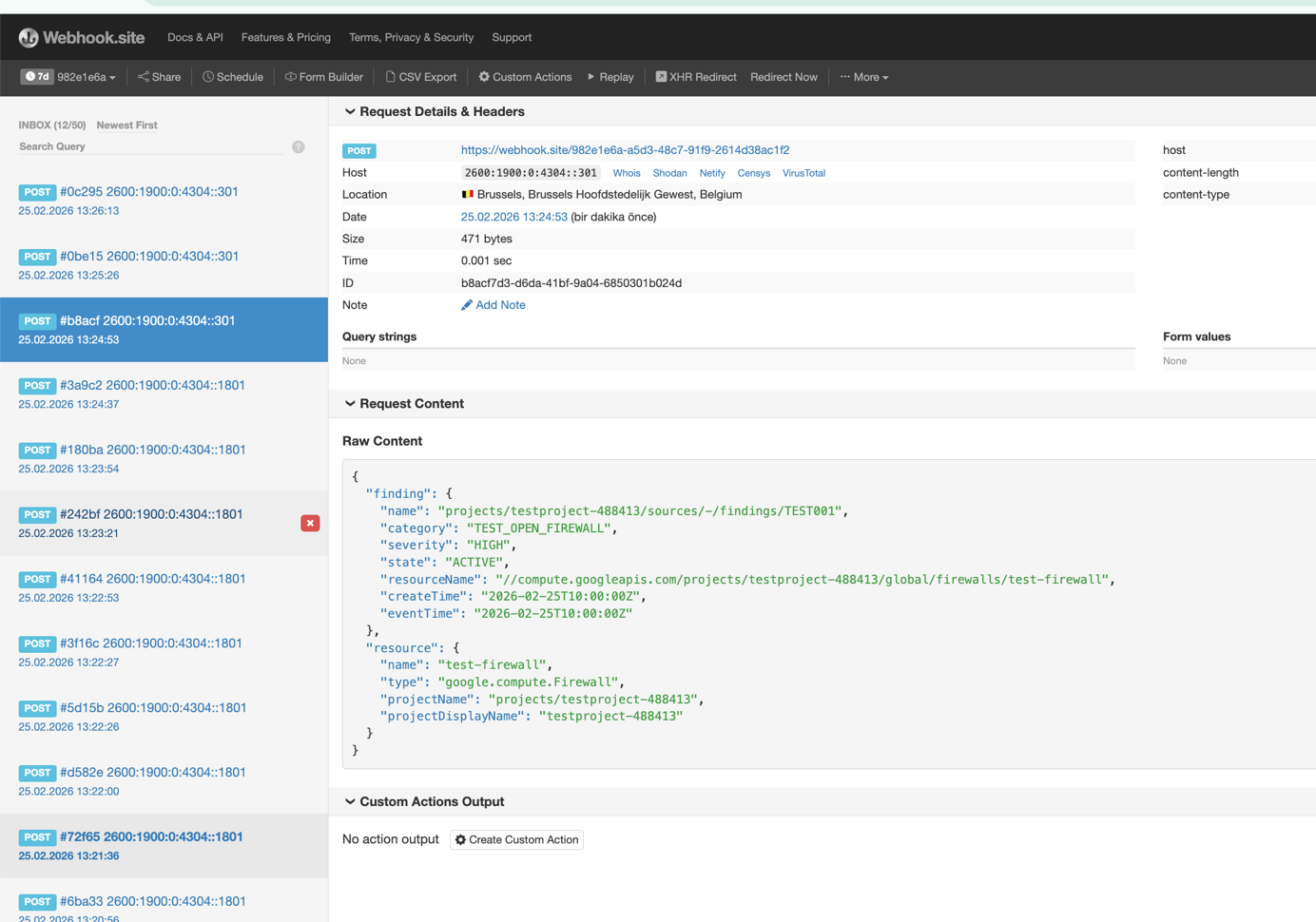
After the ACTIVE message is published, the platform webhook receives the full SCC JSON payload.
— webhook.site showing ACTIVE payload with state: "ACTIVE" and full JSON body\
\
Verify in the platform:
* A new alert was created with **Status: PROBLEM**
* The alert title reflects `finding.category` (`TEST_OPEN_FIREWALL`)
* The severity mapped correctly: `HIGH` → High
#### Verify Recovery (INACTIVE)
After the INACTIVE message is published, the platform receives the recovery payload.
— webhook.site showing INACTIVE payload with state: "INACTIVE" and matching finding.name \
\
Verify in the platform:
* The existing alert transitioned to **Status: RECOVERY**
* The `finding.name` matched the original ACTIVE alert for correct correlation
### Verification Checklist
* An **ACTIVE** finding payload was received by the platform (status: PROBLEM).
* The payload contains the correct `finding.category`, `finding.severity`, and `resource.projectDisplayName`.
* An **INACTIVE** finding payload was received after resolution (status: RECOVERY).
* The `finding.name` field is identical in both ACTIVE and INACTIVE payloads — correlation is working.
* Cloud Function logs show no errors and `Webhook response: 200` for each delivery.
### Troubleshooting
| Issue | Possible Cause | Resolution |
| ------------------------------------ | ----------------------------------------- | ---------------------------------------------------------------------------------------------------- |
| SCC menu not accessible | No Organization-level access | SCC requires Organization access. Use Option A (manual Pub/Sub publish) to test the integration. |
| No webhook requests received | Cloud Function error | Check Cloud Function **Logs** tab for error details. |
| Recovery alerts not received | SCC export filter set to `state="ACTIVE"` | Remove the filter in Step 3. With this filter, INACTIVE events are never published to Pub/Sub. |
| Payload arrives empty `{}` | Cloud Run 2nd gen message format mismatch | Ensure the code reads from `body.message.data`, not `event.data`. Use the code provided in Step 4.4. |
| Priority always falls back to MEDIUM | JSONPath misconfiguration | Verify the provider `priority.field` is exactly `$.finding.severity`. |
| Alert correlation not working | `finding.name` differs between payloads | The `finding.name` must be identical in both ACTIVE and INACTIVE messages. |
| Authentication error (401/403) | Incorrect webhook URL or token | Verify the `webhookUrl` in `index.js` matches the value copied from Step 1. |
| Cloud Function deploy error | Wrong entry point | Confirm the entry point field is set to `forwardSccToWebhook`. |