# AWS GuardDuty Integration
AWS GuardDuty is a threat detection service that continuously monitors your AWS accounts and workloads for malicious activity and unauthorized behavior. It analyzes events from AWS CloudTrail, VPC Flow Logs, and DNS logs using machine learning, anomaly detection, and integrated threat intelligence to identify threats such as unauthorized access, data exfiltration attempts, compromised EC2 instances, and cryptocurrency mining.
This integration routes GuardDuty security findings to the alert management platform via **Amazon SNS + AWS EventBridge**. When GuardDuty detects a threat, EventBridge captures the finding and forwards it to an SNS topic, which delivers the payload to the platform's webhook endpoint. The platform maps the finding's numeric severity score to a standardized priority level and opens an alert for the on-call team.
> **Note:** GuardDuty findings are one-directional — the service does not send a separate "resolved" event when a finding is archived. Alerts created from GuardDuty findings must be manually closed in the platform after investigation.
### Integration Flow
```
AWS GuardDuty
│
│ Detects threat / finding
▼
Amazon EventBridge
│
│ Rule matches "GuardDuty Finding"
▼
Amazon SNS Topic
│
│ HTTPS subscription delivers payload
▼
Platform Webhook Endpoint
│
│ Schema validation + SNS Message parsing
▼
Alert Created → Priority mapped → On-Call Team Notified
```
### Payload Schema
GuardDuty payloads arrive as SNS notification envelopes. The `Message` field contains a JSON-serialized EventBridge event with the full finding detail nested inside.
#### Outer SNS Envelope
| Field | Type | Description |
| ----------- | ------ | ------------------------------------------------------------------------ |
| `Type` | string | SNS message type (`Notification` or `SubscriptionConfirmation`) |
| `MessageId` | string | Unique identifier for this SNS message |
| `TopicArn` | string | ARN of the SNS topic that delivered the message |
| `Message` | string | **JSON-serialized EventBridge event** — parse this to access the finding |
| `Timestamp` | string | ISO 8601 timestamp when SNS delivered the message |
| `Subject` | string | SNS message subject (optional) |
#### Parsed `Message` Field (EventBridge Event)
| Field | Type | Description |
| -------------------- | ------ | ------------------------------------------------------------- |
| `version` | string | EventBridge schema version |
| `id` | string | Unique EventBridge event ID |
| `source` | string | Always `aws.guardduty` |
| `detail-type` | string | Always `GuardDuty Finding` |
| `region` | string | AWS region where the finding was generated |
| `account` | string | AWS account ID |
| `detail.id` | string | Unique GuardDuty finding ID — used as the alert fingerprint |
| `detail.type` | string | Finding type (e.g., `UnauthorizedAccess:EC2/SSHBruteForce`) |
| `detail.severity` | number | Numeric severity score from `0.1` to `8.9` |
| `detail.title` | string | Short human-readable description of the finding |
| `detail.description` | string | Detailed explanation of the threat |
| `detail.accountId` | string | AWS account where the threat was detected |
| `detail.region` | string | Region where the affected resource resides |
| `detail.createdAt` | string | ISO 8601 timestamp when the finding was first created |
| `detail.updatedAt` | string | ISO 8601 timestamp of the most recent finding update |
| `detail.resource` | object | Details about the affected AWS resource (EC2, IAM, S3, etc.) |
| `detail.service` | object | GuardDuty service metadata including action type and evidence |
### Severity Mapping
GuardDuty uses a continuous numeric severity scale. The platform maps these values to standardized priority levels as follows:
| GuardDuty Severity Range | Label | Platform Priority |
| ------------------------ | -------- | ----------------- |
| `8.0 – 8.9` | Critical | `CRITICAL` |
| `7.0 – 7.9` | High | `HIGH` |
| `4.0 – 6.9` | Medium | `MEDIUM` |
| `0.1 – 3.9` | Low | `LOW` |
> AWS currently uses severity values in the `0.1 – 8.9` range. Values `0` and `9.0 – 10.0` are reserved for future use.
### Payloads
#### Finding Detected (ALERT)
This is a real payload captured from AWS GuardDuty via SNS. The `Message` field arrives as a JSON string and must be parsed to access the finding detail.
json
```json
{
"Type": "Notification",
"MessageId": "a1b2c3d4-e5f6-7890-abcd-ef0123456789",
"TopicArn": "arn:aws:sns:us-west-2:111222333444:GuardDutyAlerts",
"Message": "{\"version\":\"0\",\"id\":\"abcd1234-5678-90ef-ghij-klmnopqrstuv\",\"detail-type\":\"GuardDuty Finding\",\"source\":\"aws.guardduty\",\"account\":\"111222333444\",\"time\":\"2026-01-15T09:42:11Z\",\"region\":\"us-west-2\",\"resources\":[],\"detail\":{\"schemaVersion\":\"2.0\",\"accountId\":\"111222333444\",\"region\":\"us-west-2\",\"id\":\"ffffeeee111122223333444455556666\",\"type\":\"UnauthorizedAccess:Runtime/TorClient\",\"severity\":4,\"createdAt\":\"2026-01-15T09:38:44.123Z\",\"updatedAt\":\"2026-01-15T09:38:44.123Z\",\"title\":\"The EC2 instance i-abcde12345 is communicating with a Tor entry node.\",\"description\":\"The process SomeRandomProcess from EC2 instance i-abcde12345 is communicating with an IP address 203.0.113.45 on the Tor Anonymizing Proxy network marked as an entry node.\",\"resource\":{\"resourceType\":\"KubernetesCluster\",\"instanceDetails\":{\"instanceId\":\"i-abcde12345\",\"instanceType\":\"t3.large\"}},\"service\":{\"serviceName\":\"guardduty\",\"action\":{\"actionType\":\"NETWORK_CONNECTION\",\"networkConnectionAction\":{\"connectionDirection\":\"OUTBOUND\",\"remoteIpDetails\":{\"ipAddressV4\":\"203.0.113.45\"}}},\"eventFirstSeen\":\"2026-01-15T09:38:44.000Z\",\"eventLastSeen\":\"2026-01-15T09:38:44.000Z\",\"archived\":false,\"count\":2}}}",
"Timestamp": "2026-01-15T09:42:11.999Z",
"SignatureVersion": "1",
"SigningCertURL": "https://sns.us-west-2.amazonaws.com/SimpleNotificationService-randomcert.pem",
"UnsubscribeURL": "https://sns.us-west-2.amazonaws.com/?Action=Unsubscribe&SubscriptionArn=arn:aws:sns:us-west-2:111222333444:GuardDutyAlerts:zzzz-yyyy-xxxx-wwww-vvvvuuuutttt"
}
```
After the platform parses the `Message` field, the key finding fields are:
json
```json
{
"id": "abcd1111222233334444555566667777",
"type": "UnauthorizedAccess:Runtime/TorClient",
"title": "The EC2 instance i-fake123456 is communicating with a Tor entry node.",
"description": "The process RandomProcessName from EC2 instance i-fake123456 is communicating with an IP address 203.0.113.77 on the Tor Anonymizing Proxy network marked as an entry node.",
"severity": 4,
"accountId": "111222333444",
"region": "eu-central-1",
"resource": {
"resourceType": "KubernetesCluster",
"instanceDetails": {
"instanceId": "i-fake123456",
"instanceType": "t3.large"
}
},
"service": {
"action": {
"actionType": "NETWORK_CONNECTION",
"networkConnectionAction": {
"connectionDirection": "OUTBOUND",
"remoteIpDetails": {
"ipAddressV4": "203.0.113.77"
}
}
},
"eventFirstSeen": "2026-01-10T08:15:30.000Z",
"eventLastSeen": "2026-01-10T08:15:30.000Z",
"count": 2
}
}
```
**Resulting alert:** Priority → `MEDIUM` (severity 5), Type → `ALERT`
### Prerequisites
Before configuring this integration, make sure you have:
* An active AWS account with GuardDuty enabled in at least one region
* Permissions to create and manage **SNS topics**, **EventBridge rules**, and **SNS subscriptions**
* A platform account with permission to create sources
### Setup
#### Step 1: Create an Alert Source on the Platform
1. Log in to the alert management platform.
2. Navigate to **Sources** → **Add Source**.
3. Select **AWS GuardDuty** as the provider.
4. Enter a name for this source (e.g., `GuardDuty – Production (us-east-1)`).
5. Save and copy the generated **Webhook URL** and **Token**.
#### Step 2: Create an SNS Topic
1. Log in to the **AWS Management Console**.
2. Open the **Simple Notification Service (SNS)** console.
3. In the left sidebar, click **Topics** → **Create topic**.
4. Configure the topic:
* **Type**: Standard
* **Name**: `GuardDutyAlerts` (or any descriptive name)
* Leave all other settings as default.
5. Click **Create topic**.
— Create topic form with Standard type selected
#### Step 3: Subscribe the Platform Webhook to the SNS Topic
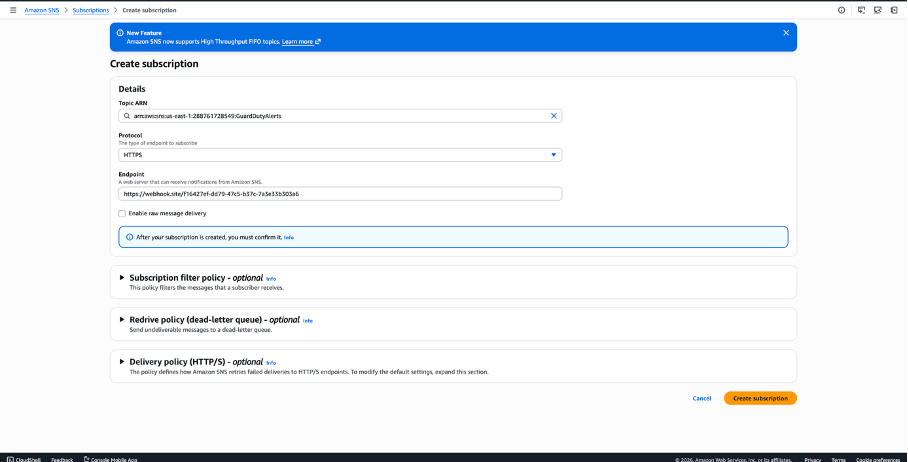
1. On the topic detail page, click **Create subscription**.
— Topic detail page with "Create subscription" button
2. Configure the subscription:
* **Topic ARN**: Auto-populated (your topic)
* **Protocol**: `HTTPS`
* **Endpoint**: Paste your platform **Webhook URL** (from Step 1)
* **Enable raw message delivery**: **Leave unchecked** ← This is critical. The SNS envelope must be preserved so the platform can validate the subscription confirmation.
— Subscription form with HTTPS protocol and webhook URL entered
3. Click **Create subscription**.
4. The platform automatically confirms the subscription. Within a few seconds, the subscription status should change from **PendingConfirmation** to **Confirmed**.
— Subscription status showing "Confirmed"
> **Important:** If the subscription remains in PendingConfirmation, verify that your webhook endpoint is publicly reachable and that the platform's SNS confirmation handler is functioning.
#### Step 4: Enable AWS GuardDuty
If GuardDuty is not yet enabled in your account:
1. Open the **GuardDuty** console.
2. Click **Get started** → **Enable GuardDuty**.
 — GuardDuty welcome screen with "Enable GuardDuty" button
> If GuardDuty is already enabled, skip to Step 5.
#### Step 5: Create an EventBridge Rule
1. Open the **Amazon EventBridge** console.
2. In the left sidebar, click **Rules** (under Buses) → **Create rule**.
3. Configure the rule:
* **Name**: `GuardDutyToSNS` (or any name)
* **Description**: Forward GuardDuty findings to SNS
* **Event bus**: `default`
* **Rule type**: Rule with an event pattern
4. Click **Next**.
5. In the **Event pattern** section:
* **Event source**: AWS events
* **AWS service**: GuardDuty
* **Event type**: GuardDuty Finding
— Event pattern form with GuardDuty Finding selected
6. The event pattern will be automatically populated:
json
```json
{
"source": ["aws.guardduty"],
"detail-type": ["GuardDuty Finding"]
}
```
> **Optional — Filter by severity:** To only forward medium, high, and critical findings (severity ≥ 4.0) to reduce noise, use a custom pattern:
>
> json
>
> ```json
> {
> "source": ["aws.guardduty"],
> "detail-type": ["GuardDuty Finding"],
> "detail": {
> "severity": [{ "numeric": [">=", 4.0] }]
> }
> }
> ```
7. Click **Next**.
8. In the **Target** section:
* **Target types**: AWS service
* **Select a target**: SNS topic
* **Topic**: Select the SNS topic created in Step 2
— Target configuration with SNS topic selected
9. Click **Next** → Review → **Create rule**.
— Rule successfully created and showing as Enabled
#### Step 6: Test the Integration
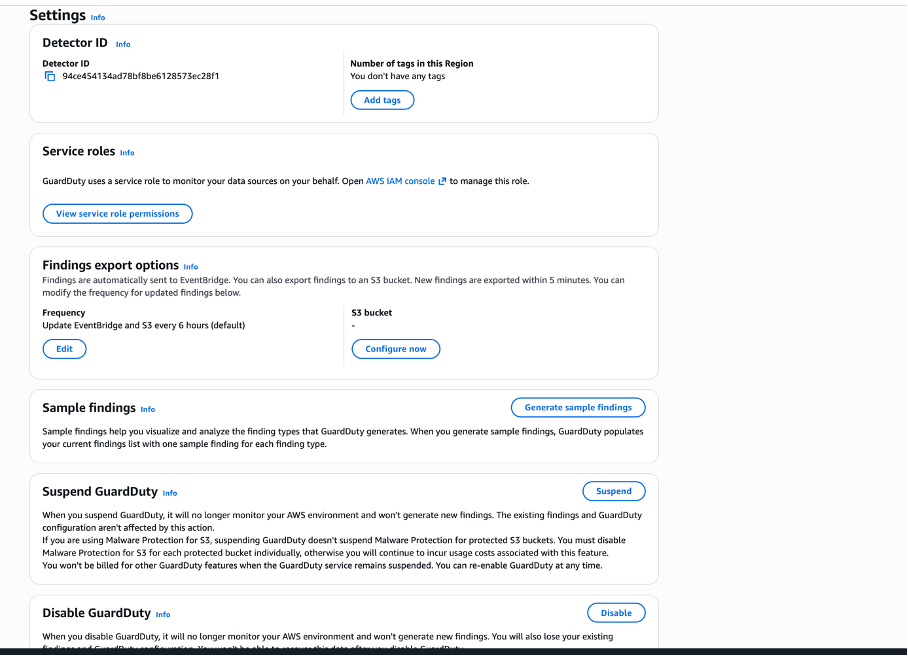
1. Open the **GuardDuty** console.
2. In the left sidebar, click **Settings**.
3. Under **Sample findings**, click **Generate sample findings**.
— GuardDuty Settings page with "Generate sample findings" button
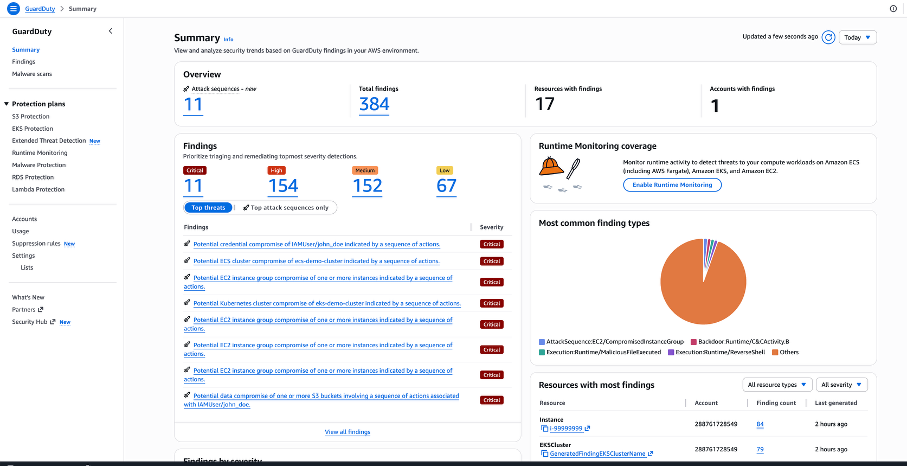
4. Click **Findings** in the left sidebar.
5. You should see multiple sample findings (prefixed with `[SAMPLE]`) in the findings list.
— GuardDuty findings list with \[SAMPLE] findings visible
6. Within a few minutes, the findings should appear as alerts on the platform.
— Platform alerts list showing GuardDuty findings as HIGH/CRITICAL alerts
> Sample findings cover all GuardDuty finding types across EC2, IAM, S3, EKS, RDS, and more. They use placeholder values and are marked with `"sample": true` in the finding JSON.a
### Finding Types Reference
GuardDuty organizes findings into categories based on the affected AWS resource and threat type. Common finding types you may receive:
| Category | Example Finding Type | Typical Severity |
| ----------------------- | ------------------------------------------------------------- | ---------------- |
| EC2 Unauthorized Access | `UnauthorizedAccess:EC2/SSHBruteForce` | Medium–High |
| EC2 Backdoor | `Backdoor:EC2/C&CActivity.B` | High |
| IAM Reconnaissance | `Recon:IAMUser/MaliciousIPCaller` | Medium |
| IAM Unauthorized Access | `UnauthorizedAccess:IAMUser/ConsoleLoginSuccess.B` | Medium–High |
| S3 Data Exfiltration | `Exfiltration:S3/ObjectRead.Unusual` | High |
| S3 Policy Modification | `Policy:S3/BucketPublicAccessGranted` | High |
| EC2 Crypto Mining | `CryptoCurrency:EC2/BitcoinTool.B` | High |
| RDS Brute Force | `CredentialAccess:RDS/AnomalousBehavior.SuccessfulBruteForce` | High–Critical |
The full list of GuardDuty finding types is available in the [AWS GuardDuty documentation](https://docs.aws.amazon.com/guardduty/latest/ug/guardduty_finding-types-active.html).
***
### Multi-Region Setup
GuardDuty operates at the region level. If you have GuardDuty enabled in multiple AWS regions, you must repeat Steps 2–5 for each region, or use **GuardDuty multi-account / delegated administrator** setup to aggregate findings to a central account.
For multi-region setups, it is recommended to:
1. Create one SNS topic per region (e.g., `GuardDutyAlerts-us-east-1`, `GuardDutyAlerts-eu-west-1`).
2. Create separate platform sources per region for clear visibility.
3. Name each source with the region (e.g., `GuardDuty – Production (eu-west-1)`).
***
### Alert Lifecycle
| Platform Event | Trigger |
| ------------------ | ---------------------------------------------------- |
| Alert OPENED | GuardDuty finding delivered via SNS |
| Alert priority set | Based on `detail.severity` numeric score |
| Alert CLOSED | **Manual** — GuardDuty does not send recovery events |
> After resolving a security finding in AWS (archiving it in GuardDuty), manually close the corresponding alert in the platform to keep your incident queue clean.
***
### Troubleshooting
| Problem | Likely Cause | Solution |
| ----------------------------------------- | ---------------------------------------------------------------- | ----------------------------------------------------------------------------- |
| Subscription stays in PendingConfirmation | Platform endpoint not reachable or SNS confirmation not handled | Verify the webhook URL is correct and publicly accessible |
| No alerts arriving after rule creation | EventBridge rule not matching, or SNS subscription not confirmed | Check CloudWatch metrics for the EventBridge rule; verify subscription status |
| Alerts arrive but priority is always LOW | Severity below 4.0 or parsing error in `Message` field | Confirm `Enable raw message delivery` is unchecked on the SNS subscription |
| Duplicate alerts | EventBridge rule triggered multiple times or SNS retry | Check EventBridge rule targets — there should be exactly one SNS target |
| Sample findings not appearing on platform | Rule or subscription created after sample generation | Re-generate sample findings after confirming the full integration is set up |
| Finding type not recognized | New GuardDuty finding type added by AWS | All findings are accepted; only severity affects priority mapping |