# AWS Cloudwatch Integration
## Amazon CloudWatch Integration
Amazon CloudWatch is a monitoring and observability service built for AWS cloud resources, providing real-time metrics, alarms, and automated actions across your entire AWS infrastructure.
### Overview
This guide walks you through integrating Amazon CloudWatch with our alert management platform. CloudWatch alarm notifications are delivered through Amazon Simple Notification Service (SNS) as HTTP POST webhooks. The `Message` field inside the SNS envelope contains a JSON-encoded string with the full alarm details including alarm name, state change, trigger condition, and affected resource.
### Integration Flow
1. CloudWatch continuously monitors AWS resource metrics (CPU, memory, disk, network, custom metrics, etc.).
2. When a metric violates a configured alarm threshold, CloudWatch changes the alarm state to **ALARM** and publishes a notification to the linked SNS topic.
3. The SNS topic delivers the notification payload to the subscribed HTTPS endpoint (our platform webhook).
4. When the metric returns to normal, CloudWatch changes the alarm state to **OK** and publishes a recovery notification through the same SNS topic.
***
### Webhook Payload Schema
CloudWatch alarm notifications are wrapped in an **SNS notification envelope**. The payload structure is standardized by AWS and cannot be customized.
#### SNS Envelope Fields
| Field | Type | Required | Description |
| ---------------- | ------ | -------- | --------------------------------------------------------------------------- |
| Type | string | Yes | SNS message type (`Notification`, `SubscriptionConfirmation`) |
| MessageId | string | Yes | Unique identifier for the SNS message |
| TopicArn | string | Yes | ARN of the SNS topic that published the message |
| Subject | string | No | Alert summary, e.g. `ALARM: "high-cpu-test-alarm" in US East (N. Virginia)` |
| Message | string | Yes | JSON-encoded string containing the full CloudWatch alarm details |
| Timestamp | string | Yes | ISO 8601 timestamp of the notification |
| SignatureVersion | string | No | Version of the SNS message signature |
| Signature | string | No | Base64-encoded signature for message verification |
| SigningCertURL | string | No | URL of the certificate used to sign the message |
| UnsubscribeURL | string | No | URL to unsubscribe from the SNS topic |
#### Inner Message Fields (JSON-encoded inside `Message`)
| Field | Type | Description |
| ---------------- | ------ | ------------------------------------------------------------------ |
| AlarmName | string | Name of the CloudWatch alarm |
| AlarmDescription | string | Description of the alarm |
| AWSAccountId | string | AWS account ID |
| NewStateValue | string | Current alarm state: `ALARM`, `OK`, or `INSUFFICIENT_DATA` |
| NewStateReason | string | Human-readable explanation of the state change |
| StateChangeTime | string | Timestamp of the state change |
| Region | string | AWS region where the alarm is configured |
| AlarmArn | string | Full ARN of the CloudWatch alarm |
| OldStateValue | string | Previous alarm state |
| Trigger | object | Object containing MetricName, Namespace, Threshold, Dimensions etc |
***
### Severity / Status Mapping
CloudWatch does not have a native severity field. The alarm state is used to determine the alert status:
| CloudWatch State | Platform Status | Description |
| ------------------ | --------------- | ---------------------------------------------- |
| ALARM | PROBLEM | Threshold breached, resource is in alarm state |
| OK | RECOVERY | Metric returned to normal, alarm cleared |
| INSUFFICIENT\_DATA | PROBLEM | Not enough data to evaluate the alarm |
**Priority Mapping** Priority is inferred from the alarm name. To enable automatic priority mapping, include one of the following keywords in your alarm name:
* `CRITICAL` → Critical
* `HIGH` → High
* `WARN` or `WARNING` → Medium
* `LOW` or `INFO` → Low
Alarms without these keywords default to **Medium** priority. Example: `prod-database-CRITICAL-cpu-alarm`
***
### Alert Payload Examples
#### Raised (ALARM)
This payload is sent when a CloudWatch alarm is triggered. The `Subject` field begins with `ALARM:` and the inner `NewStateValue` is `ALARM`.

ALARM payload received at webhook.site
```json
{
"Type": "Notification",
"MessageId": "xxxxxxxx-xxxx-xxxx-xxxx-xxxxxxxxxxxx",
"TopicArn": "arn:aws:sns:region:ACCOUNT_ID:TOPIC_NAME",
"Subject": "ALARM: \"example-alarm-name\" in REGION",
"Message": "{\"AlarmName\":\"example-alarm-name\",\"AlarmDescription\":\"Test alarm description\",\"AWSAccountId\":\"ACCOUNT_ID\",\"NewStateValue\":\"ALARM\",\"NewStateReason\":\"Threshold Crossed: example reason\",\"StateChangeTime\":\"2026-02-10T17:18:34.056+0000\",\"Region\":\"REGION\",\"AlarmArn\":\"arn:aws:cloudwatch:region:ACCOUNT_ID:alarm:example-alarm-name\",\"OldStateValue\":\"INSUFFICIENT_DATA\",\"Trigger\":{\"MetricName\":\"ExampleMetric\",\"Namespace\":\"AWS/Service\",\"StatisticType\":\"Statistic\",\"Statistic\":\"AVERAGE\",\"Unit\":null,\"Dimensions\":[{\"value\":\"example-resource\",\"name\":\"ResourceName\"}],\"Period\":86400,\"EvaluationPeriods\":1,\"DatapointsToAlarm\":1,\"ComparisonOperator\":\"GreaterThanThreshold\",\"Threshold\":0.0}}",
"Timestamp": "2026-02-10T17:18:34.096Z",
"SignatureVersion": "1",
"Signature": "REDACTED",
"SigningCertURL": "https://sns.region.amazonaws.com/SimpleNotificationService.pem",
"UnsubscribeURL": "https://sns.region.amazonaws.com/?Action=Unsubscribe"
}
```
#### Cleared (OK)
This payload is sent when the alarm returns to normal. The `Subject` field begins with `OK:` and the inner `NewStateValue` is `OK`.
```json
{
"Type": "Notification",
"MessageId": "xxxxxxxx-xxxx-xxxx-xxxx-xxxxxxxxxxxx",
"TopicArn": "arn:aws:sns:region:ACCOUNT_ID:TOPIC_NAME",
"Subject": "OK: \"example-alarm-name\" in REGION",
"Message": "{\"AlarmName\":\"example-alarm-name\",\"AlarmDescription\":\"Test alarm description\",\"AWSAccountId\":\"ACCOUNT_ID\",\"NewStateValue\":\"OK\",\"NewStateReason\":\"Recovery reason\",\"StateChangeTime\":\"2026-02-10T17:28:07.334+0000\",\"Region\":\"REGION\",\"AlarmArn\":\"arn:aws:cloudwatch:region:ACCOUNT_ID:alarm:example-alarm-name\",\"OldStateValue\":\"ALARM\",\"Trigger\":{\"MetricName\":\"ExampleMetric\",\"Namespace\":\"AWS/Service\",\"StatisticType\":\"Statistic\",\"Statistic\":\"AVERAGE\",\"Unit\":null,\"Dimensions\":[{\"value\":\"example-resource\",\"name\":\"ResourceName\"},{\"value\":\"example-dimension\",\"name\":\"DimensionType\"}],\"Period\":86400,\"EvaluationPeriods\":1,\"DatapointsToAlarm\":1,\"ComparisonOperator\":\"GreaterThanThreshold\",\"Threshold\":0.0}}",
"Timestamp": "2026-02-10T17:28:07.380Z",
"SignatureVersion": "1",
"Signature": "REDACTED",
"SigningCertURL": "https://sns.region.amazonaws.com/SimpleNotificationService.pem",
"UnsubscribeURL": "https://sns.region.amazonaws.com/?Action=Unsubscribe"
}
```
***
### Installation & Configuration
#### Step 1: Create an Alert Source in the Platform
1. Log in to the alert management platform.
2. Navigate to **Integrations** → **Add Integration**.
3. Select **Amazon CloudWatch** as the provider.
4. Name the integration (e.g., `Production AWS Alerts`).
5. Save and copy the generated **Webhook URL** and **Token**.
#### Step 2: Create an SNS Topic in AWS
1. Log in to the **AWS Management Console**.
2. Navigate to **Simple Notification Service (SNS)** → **Topics**.
3. Click **Create topic**.
4. Select type: **Standard** (not FIFO).
5. Enter a topic name (e.g., `oncall-cloudwatch-alerts`).
6. Leave all other settings as default.
7. Click **Create topic**.
* SNS Create Topic page (Standard type selected, topic name entered)
8. Note the **Topic ARN** displayed on the topic detail page.
* SNS Topic created with ARN visible
#### Step 3: Create an SNS Subscription (Webhook Endpoint)
1. On the topic detail page, go to the **Subscriptions** tab.
2. Click **Create subscription**.
3. **Topic ARN**: Pre-filled with the topic ARN (do not change).
4. **Protocol**: Select **HTTPS**.
5. **Endpoint**: Paste your platform webhook URL (e.g., `https:///functions/v1/webhook`).
6. **Enable raw message delivery**: Leave **unchecked** (disabled). This ensures the full SNS envelope is delivered.
7.
* Click **Create subscription**.
1. The subscription status will initially show **PendingConfirmation**.
* SubscriptionConfirmation payload received at webhook.site
9. The platform will automatically confirm the subscription. If using a third-party test endpoint (e.g., webhook.site), manually open the `SubscribeURL` from the received payload in your browser.
* SubscribeURL opened in browser showing confirmation XML response
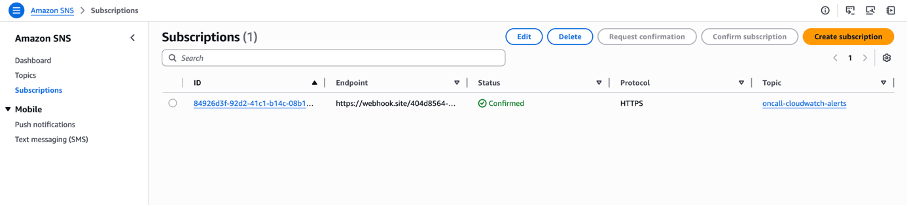
10. After refreshing, the subscription status should change to **Confirmed**.
* SNS Subscription status: Confirmed
#### Step 4: Create a CloudWatch Alarm and Link to the SNS Topic
1. Navigate to **CloudWatch** → **Alarms** → **All alarms**.
2. Click **Create alarm**.
3. Click **Select metric** and choose the metric you want to monitor (e.g., EC2 CPUUtilization, RDS connections, S3 object count, or a custom metric).
4. Configure the alarm condition:
* **Period**: Select an appropriate evaluation period (e.g., 1 minute, 5 minutes).
* **Threshold type**: Static.
* **Condition**: Greater than (or your preferred operator).
* **Threshold value**: Set the desired threshold.
5. Click **Next** to configure actions.
6. Under **Notification**, configure **two** notification actions:
**Action 1 — In alarm (Trigger):**
* Alarm state trigger: **In alarm**
* Select an existing SNS topic: Choose the topic created in Step 2 (e.g., `oncall-cloudwatch-alerts`)
**Action 2 — OK (Recovery):**
* Click **Add notification**
* Alarm state trigger: **OK**
* Select an existing SNS topic: Choose the same topic
* Configure actions page showing both In Alarm and OK notification actions
7. Click **Next**, name your alarm, add a description, and click **Create alarm**.
* Alarm successfully created (state: Insufficient data, Actions enabled)
> **Important:** Both **In alarm** and **OK** notification actions must be configured to ensure proper alert lifecycle handling and automatic recovery.
***
### Testing
Once the alarm is triggered, you can verify the integration by checking the received payloads.
#### Verify ALARM Notification
When the alarm condition is met, CloudWatch will automatically send an ALARM notification through SNS to your webhook endpoint.
* ALARM payload received at webhook.site (Type: Notification, Subject starts with "ALARM:")
* CloudWatch dashboard showing alarm in "In alarm" state
#### Trigger a Manual OK (Recovery) via CloudShell
To test the recovery flow, use **AWS CloudShell** (available in the AWS Console top toolbar) to manually set the alarm state to OK:
```bash
aws cloudwatch set-alarm-state \
--alarm-name "high-cpu-test-alarm" \
--state-value OK \
--state-reason "Recovery test - CPU back to normal" \
--region us-east-1
```
* CloudShell with set-alarm-state OK command executed, alarm state changed to OK
#### Verification Checklist
Verify that:
1. An **ALARM** notification is received by the platform (status: PROBLEM).
2. An **OK** notification is received after recovery (status: RECOVERY).
3. Both payloads contain the correct `Type: "Notification"`, `TopicArn`, `Subject`, and `Message` fields.
***
### Troubleshooting
| Issue | Possible Cause | Resolution |
| ----------------------------- | ----------------------------------------------------- | ------------------------------------------------------------------------------------------------ |
| No alerts received | SNS subscription not confirmed | Check subscription status in SNS Console. Re-create subscription if stuck on PendingConfirmation |
| No alerts received | Alarm notification action not configured | Ensure the SNS topic is attached to the alarm's In Alarm action |
| Recovery alerts missing | OK notification action not configured | Add the SNS topic to the alarm's OK action via **Add notification** |
| SubscriptionConfirmation only | Endpoint did not confirm the subscription | Open the `SubscribeURL` in a browser or ensure your platform auto-confirms |
| Payload format unexpected | Raw message delivery is enabled | Disable "Enable raw message delivery" in the SNS subscription settings |
| Delayed notifications | Alarm evaluation period too long | Reduce the alarm's Period setting for faster evaluation |
| Invalid payload error | Payload does not match the expected CloudWatch schema | Verify the subscription is HTTPS and raw delivery is disabled |
| Duplicate notifications | Multiple SNS subscriptions for the same endpoint | Remove duplicate subscriptions from the SNS topic |