# AWS Budget Integration
### Overview
AWS Budgets lets you set spending thresholds on your AWS account and get notified when your actual or forecasted costs cross those limits. The alerts don't come directly as webhooks — they travel through Amazon SNS first, which wraps everything in an envelope and delivers it to your endpoint as an HTTP POST.
The `Message` field inside that envelope is a JSON-encoded string containing the real alert details: budget name, spend amounts, notification type, and the billing period. The platform parses this automatically, so you don't have to do anything special on your end.
One thing worth knowing upfront: AWS Budgets only fires when a threshold is crossed. There's no recovery notification when spending drops back down — so alerts created by this integration will need to be closed manually in the platform after you've reviewed them.
***
### Integration Flow
```
AWS Budgets
│
│ Threshold exceeded
▼
Amazon SNS Topic
│
│ HTTPS subscription delivers payload
▼
Platform Webhook Endpoint
│
│ SNS envelope parsed → Message field decoded
│ Fingerprint: md5(BudgetName::AccountId)
▼
Alert Created → Priority mapped → On-Call Team Notified
```
***
### Provider Configuration & Mapping
AWS Budgets uses the same SNS envelope pattern as Amazon CloudWatch — the priority information lives inside a JSON string in the `Message` field, not at the top level. The platform extracts `NotificationType` from the parsed message to determine priority.
**Priority Mapping Config:**
```json
{
"priority": {
"field": "_priority",
"options": [
{ "value": "HIGH", "label": "Actual Spend Exceeded" },
{ "value": "MEDIUM", "label": "Forecasted Spend Exceeded" }
],
"mapping": {
"HIGH": "HIGH",
"MEDIUM": "MEDIUM"
}
}
}
```
**Priority Mapping Table:**
| NotificationType (inside Message) | Platform Priority | Description |
| --------------------------------- | ----------------- | --------------------------------------------------- |
| `ACTUAL` | HIGH | Real spend has crossed the threshold |
| `FORECASTED` | MEDIUM | Projected spend is on track to exceed the threshold |
**Fingerprint (Correlation) Field:**\
`md5(BudgetName::AccountId)` — ties all alerts from the same budget in the same account together.
### Alert Payload Example
#### Raised (Actual Spend — OVER\_BUDGET)
This is what arrives at your webhook when actual spending crosses the threshold. The `NotificationType` inside `Message` is `ACTUAL`, which maps to **HIGH** priority.
— *ALARM payload received at webhook.site (Type: Notification, Subject: AWS Budgets Notification)*
```json
{
"Type": "Notification",
"MessageId": "4fcbd345-c623-5a4b-baa0-b1643acab804",
"TopicArn": "arn:aws:sns:us-east-1:288761728549:oncall-budget-alerts",
"Subject": "AWS Budgets Notification",
"Message": "{\"AlarmName\":\"test-oncall-budget\",\"AccountId\":\"288761728549\",\"BudgetName\":\"test-oncall-budget\",\"BudgetType\":\"COST\",\"BudgetLimit\":{\"Amount\":\"1.0\",\"Unit\":\"USD\"},\"ActualSpend\":{\"Amount\":\"0.85\",\"Unit\":\"USD\"},\"ForecastedSpend\":{\"Amount\":\"1.20\",\"Unit\":\"USD\"},\"NotificationThreshold\":\"80.0\",\"NotificationType\":\"ACTUAL\",\"AlertType\":\"OVER_BUDGET\",\"TimePeriod\":{\"Start\":\"2026-03-01\",\"End\":\"2026-03-31\"},\"Timestamp\":\"2026-03-04T10:00:00Z\"}",
"Timestamp": "2026-03-04T09:26:01.834Z",
"SignatureVersion": "1",
"Signature": "REDACTED",
"SigningCertURL": "https://sns.us-east-1.amazonaws.com/SimpleNotificationService-7506a1e35b36ef5a444dd1a8e7cc3ed8.pem",
"UnsubscribeURL": "https://sns.us-east-1.amazonaws.com/?Action=Unsubscribe&SubscriptionArn=arn:aws:sns:us-east-1:288761728549:oncall-budget-alerts:a2a819e7-cf5d-4981-9a96-b56238145e7c"
}
```
Resulting alert: **Priority → HIGH**, **Type → ALERT**
> AWS Budgets does not send a recovery payload when spending drops below the threshold. Alerts created by this integration must be closed manually in the platform.
***
### Installation & Configuration
#### Step 1: Get Your Webhook URL
Head to **Sources → Add Source**, pick **AWS Budgets** as the provider, give it a name like `AWS Budget Alerts – Production`, and hit Save. Copy the generated **Webhook URL** — you'll need it in the next step.
#### Step 2: Create an SNS Topic
1. Log in to the **AWS Management Console** and navigate to **Simple Notification Service (SNS) → Topics**.
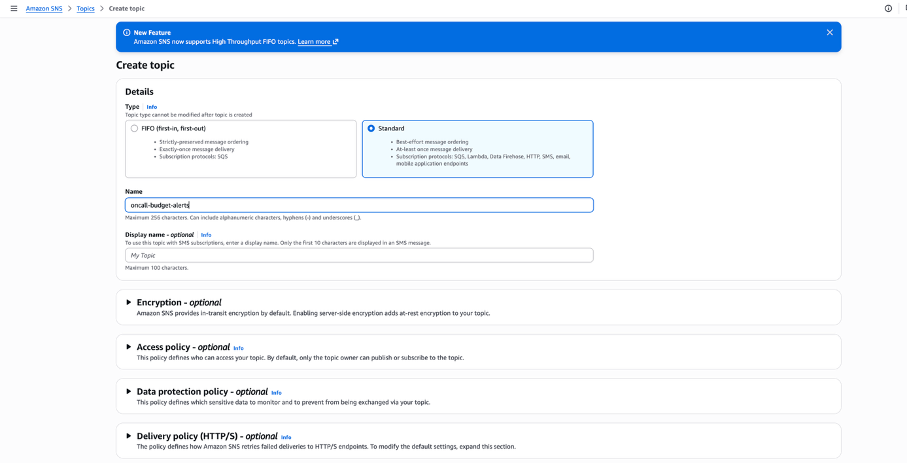
2. Click **Create topic**, select type **Standard** (not FIFO), and give it a name like `oncall-budget-alerts`.
3. Leave everything else as default and click **Create topic**.
4. Note the **Topic ARN** on the detail page — you'll need this when setting up the budget alert.
#### Step 3: Subscribe the Webhook to the SNS Topic
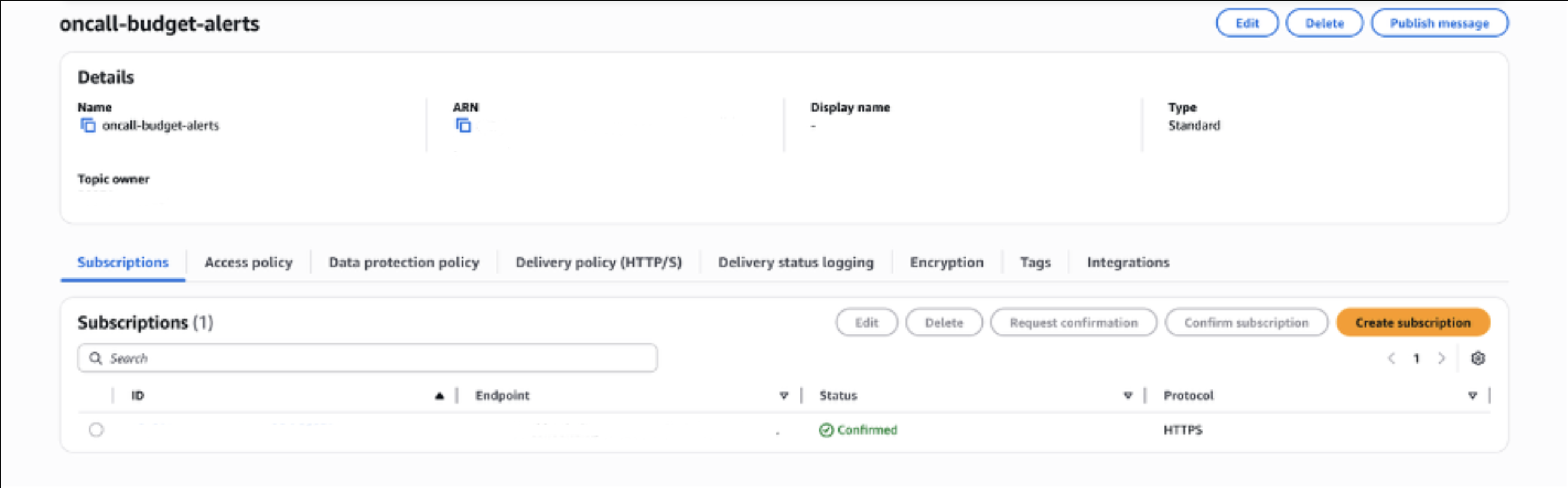
1. On the topic detail page, go to the **Subscriptions** tab and click **Create subscription**.
2. Protocol: **HTTPS**
3. Endpoint: Paste your platform webhook URL from Step 1.
4. **Enable raw message delivery:** Leave this **unchecked**. The full SNS envelope needs to reach the platform intact.
5. Click **Create subscription**.
The subscription will show `PendingConfirmation` right away. AWS fires a `SubscriptionConfirmation` payload to your endpoint — open the `SubscribeURL` value from that payload in your browser to confirm it.
> **Heads up:** The confirmation URL expires in about 3 minutes. If you see `Invalid token`, go to the Subscriptions tab, delete the pending one, and create a fresh subscription.
***
#### Step 4: Create a Budget and Link It to the SNS Topic
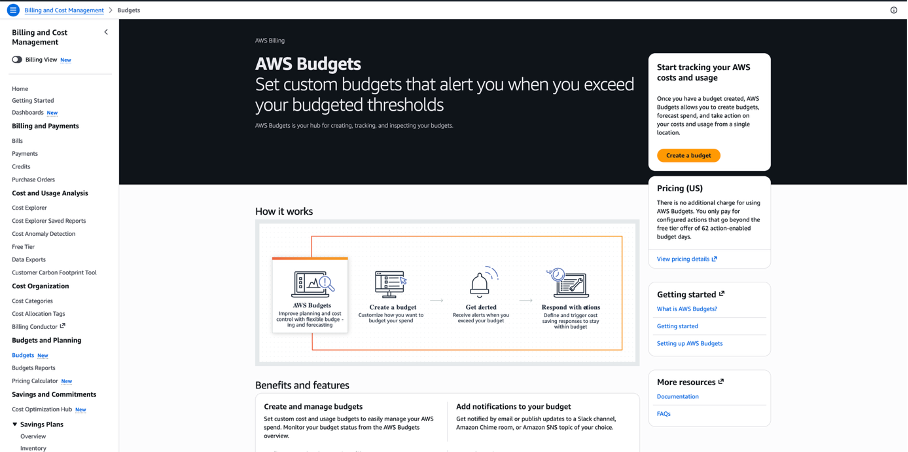
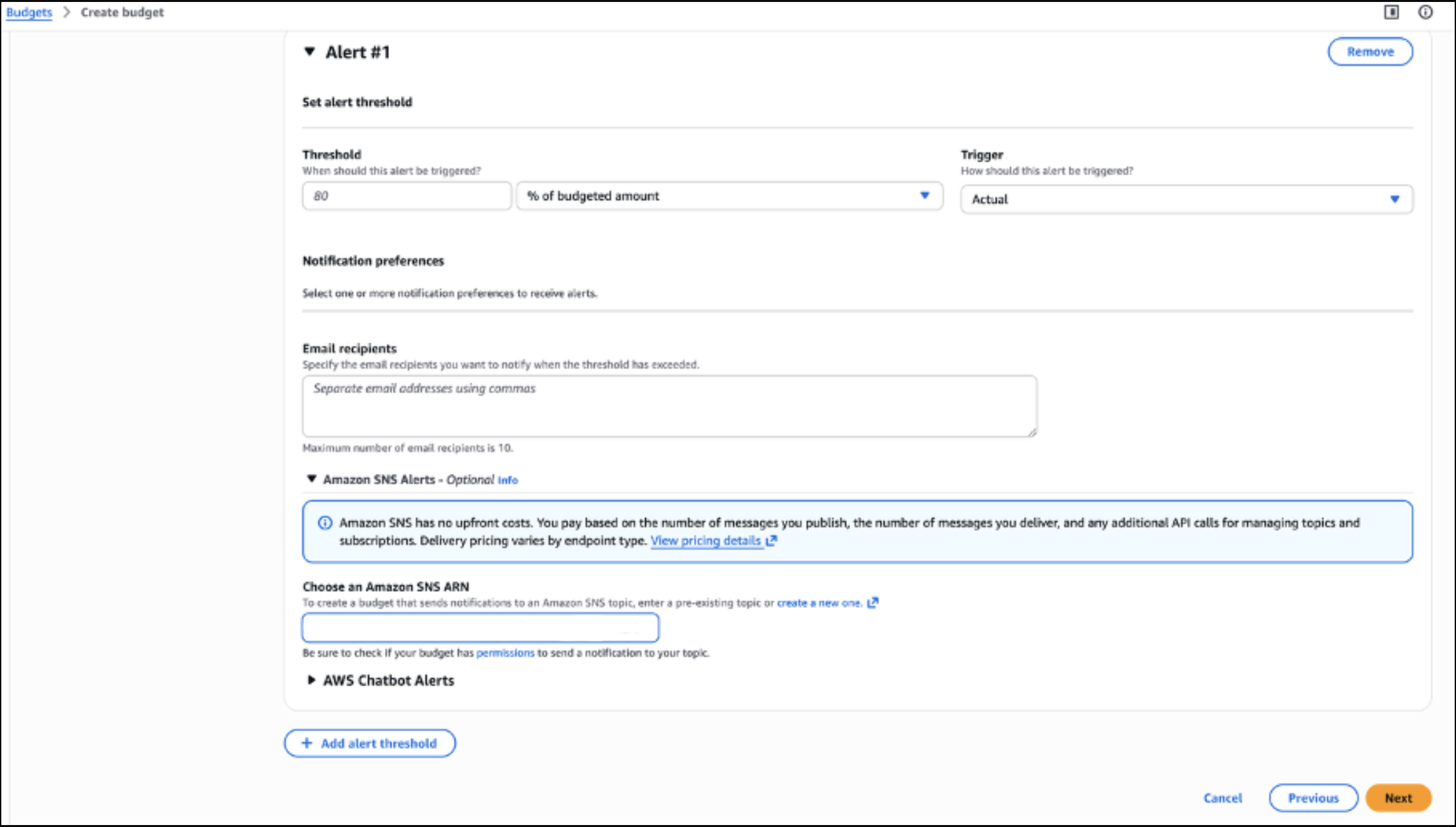
1. Navigate to **AWS Billing → Budgets → Create budget**.
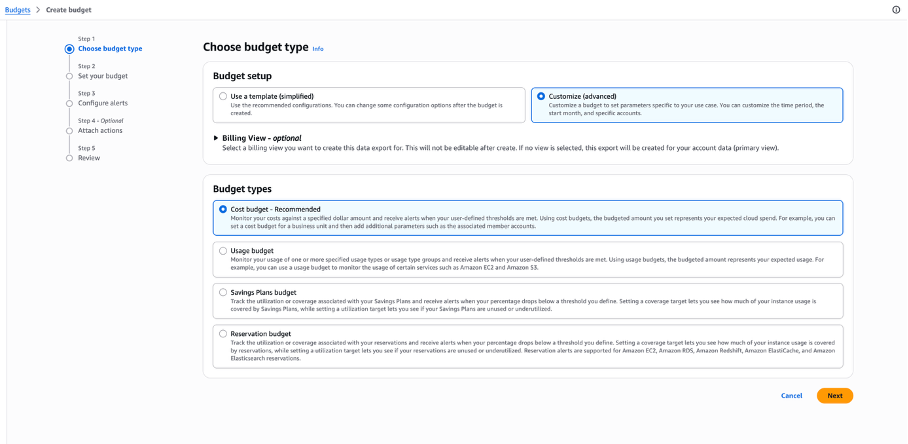
2. Select **Customize (advanced)** — the simplified template doesn't expose SNS alert options.
3. Set your **Budget name**, **Period** (Monthly), and **Budget amount**.
4. In the **Alerts** section:
* Threshold: your desired percentage (e.g., `80%`)
* Trigger: `Actual` or `Forecasted`
* SNS alert: paste the **Topic ARN** from Step 2
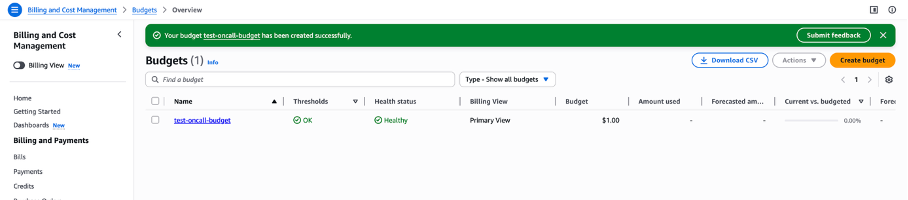
5. Click **Next → Next → Create budget**.
***
#### Step 5: Test the Integration
Real budget alerts only fire when a threshold is actually crossed, which can take days. Instead, use SNS Publish to send a test payload right now.
1. Go to **SNS → Topics → `oncall-budget-alerts`** and click **Publish message**.
2. **Subject:** `AWS Budgets Notification`
3. **Message body:**
```json
{
"AlarmName": "test-oncall-budget",
"AccountId": "123456789012",
"BudgetName": "test-oncall-budget",
"BudgetType": "COST",
"BudgetLimit": {"Amount": "1.0", "Unit": "USD"},
"ActualSpend": {"Amount": "0.85", "Unit": "USD"},
"ForecastedSpend": {"Amount": "1.20", "Unit": "USD"},
"NotificationThreshold": "80.0",
"NotificationType": "ACTUAL",
"AlertType": "OVER_BUDGET",
"TimePeriod": {"Start": "2026-03-01", "End": "2026-03-31"},
"Timestamp": "2026-03-04T10:00:00Z"
}
```
4. Click **Publish message** and check your webhook endpoint.
— *SNS Publish message form with Subject and Message body filled in*
— *Test payload received (Type: Notification, Message field visible)*
***
### Verification Checklist
* A budget notification payload was received by the platform (status: PROBLEM).
* The `Subject` field reads `AWS Budgets Notification`.
* The `Message` field contains a valid JSON string with `BudgetName`, `AccountId`, `NotificationType`, and `AlertType`.
* Priority mapped correctly: `ACTUAL` → HIGH, `FORECASTED` → MEDIUM.
* The platform created an alert with the budget name visible in the alert title.
***
### Troubleshooting
| Issue | Possible Cause | Resolution |
| ------------------------------------------------------------------------ | ------------------------------------------------ | ------------------------------------------------------------------------------------------------------------ |
| Subscription stuck on `PendingConfirmation` | Confirmation URL expired or endpoint unreachable | Delete the subscription and create a new one. Open the `SubscribeURL` immediately after it arrives. |
| No alerts received after budget creation | Threshold not yet crossed | Use SNS Publish with a test message body to validate without waiting for a real breach. |
| `Invalid payload` error | Raw message delivery is enabled | Disable **Enable raw message delivery** on the SNS subscription. The full SNS envelope is required. |
| Priority always maps to MEDIUM | `NotificationType` not parsed correctly | Verify the `Message` field is a valid JSON string and `NotificationType` is either `ACTUAL` or `FORECASTED`. |
| Alerts not closing automatically | AWS Budgets does not send recovery events | This is an AWS limitation. Close budget alerts manually in the platform after investigation. |
| Duplicate alerts for the same budget | Multiple SNS subscriptions for the same endpoint | Remove duplicate subscriptions from the SNS topic. |
| `SubscriptionConfirmation` payload received but status stays unconfirmed | `SubscribeURL` not opened in time | Copy the `SubscribeURL` from the confirmation payload and open it in a new browser tab. |